PSP Emulation on PS4/PS5 in 2025

Within the last year, I’ve noticed a slew of PSP titles now available on the PS4 and PS5 thanks to the retro focus of the PS+ classics catalog. What was intended to entice me to join the platinum tier of Sony’s subscription service ended up being a gold mine of free downloads from the many digital purchases I’ve made in the past. I recently booted up a handful of these titles to give them a spin and figured I’d share my findings. After doing some searches for information online, there’s a lot of misinformation and outdated posts so I figured I’d make this breakdown of the current state PS4/PS5 emulator and compare it to PC’s alternative and, of course, the real thing. Let me be clear that I’m only speaking of PSP games and emulation, not the PS1 and PS2 games that are also in the classics catalog and also have emulators on the PS4/PS5. For this analysis, I focused on 3 specific releases: Daxter, Killzone Liberation, and Resistance Retribution.
PSP on PS4/PS5
On both the PS4 and PS5 these games render at 1920×1440, upscaling from the native PSP resolution of 480×272, and a 4x integer scale puts the resolution at 1920×1088. I didn’t see any cropping so it’s likely that the pixels aren’t quite 1:1 on the scaler, but honestly I didn’t find anything to look too off or stretched. If you play on a vanilla PS4, the game will downscale to 1080p, and on PS4 Pro, PS5, and PS5 Pro the image can also output upscaled to 1440p or 2160p (4K), depending on your set resolution. You can also hit the Options button to enter the emulator menu and navigate to settings for further customization. There you will find an underscan feature that allows you to crop the image to different scaling values, adding black borders. I didn’t love that the values were seemingly arbitrary numbers like “+1” and “+2,” but the effect is clearly seen as you change settings. Visuals will look modernized by default and overall I find that it creates a clean image that looks preferable when putting these titles on much higher resolutions. If you prefer, the settings also have 3 additional visual presets: modern, classic arcade, and modern arcade. Frankly, I couldn’t tell much of a difference with each of the presets other than default aside from tweaking brightness and/or softening the image in some way. None of these looked ideal to my eyes and there is notably no scanline feature, so my recommendation is to leave the settings to default for both the underscan and visual presets. Of note, any full motion video (FMV) cutscenes will remain in original resolution and simply be upscaled, so expect it to be blurry and chock full of artifacts. This is the nature of the beast since those are pre-rendered and can’t be rendered by the emulator.
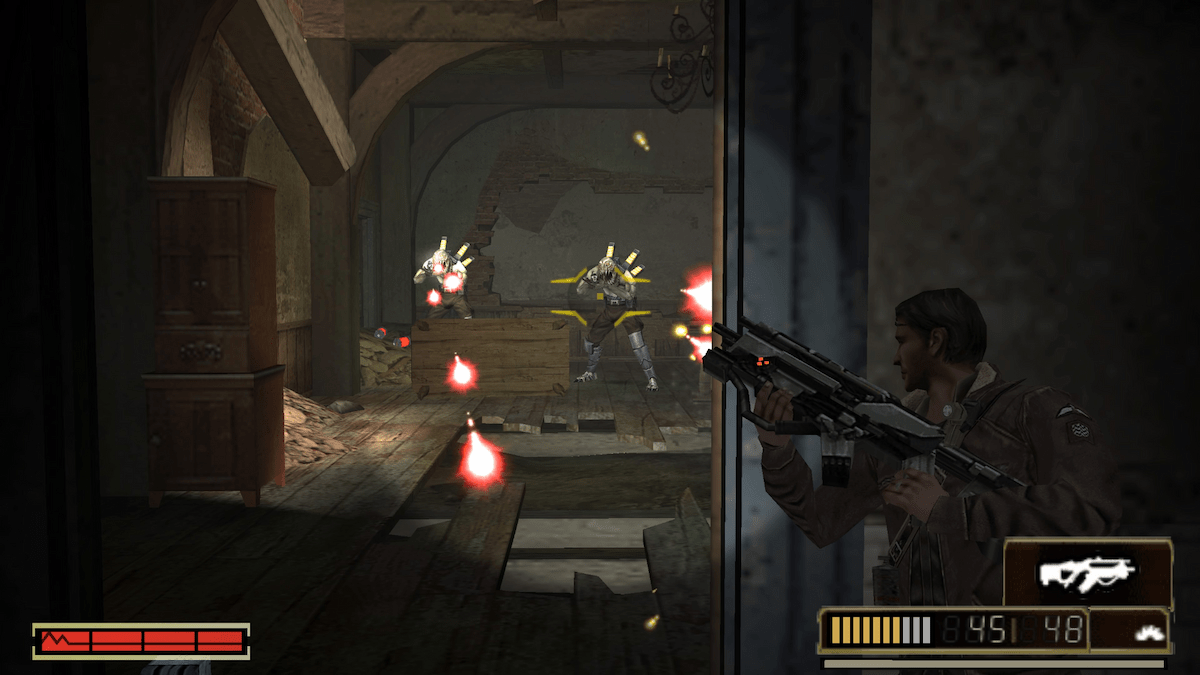
Performance is unchanged, which didn’t surprise me, but seems to shock both those posting on Reddit threads and pundits alike. Folks, the PSP was designed to run portably with low power usage for the sake of the battery, so almost every game was locked at 30 frames per second (fps). Even if you could unlock the framerate or boost to 60, which is possible on the PC emulator, the games were often programmed around clock speed so the increase has adverse effects like doubling the speed of the game. In short, PSP games were built for 30 fps and should be played at that framerate as a general rule for the best overall experience. Sony is definitely not going to play with these variables, so it’s no surprise to see. Aside from that, I found that all 4 versions of the PS4/PS5 combo performed the same and I bet there’s plenty of overhead to tackle anything a PSP game can throw at these systems. I noticed some performance hiccups from time to time, there are definitely oddities on FMV cutscenes, and I’m sure someone out there has found the random moments where a PS5 may eek better performance than a PS4.
As previously mentioned, pressing the Option button enters the emulator menu, which can be a critical detail for some games and opens up quality of life features on all titles. I saw people complaining that Resistance Retribution didn’t have the auto-aim or a way to play “infected mode,” but navigating the settings in the menu reveals these options. There’s also a rewind feature that keeps some 30 or 40 bookmarked moments in intervals so that you can go back a few seconds or even a few minutes. Save states are also present and work so well that I find myself using these rather than standard saves, which are also supported and work just like a standard PSP. It’s also possible to customize the controls as you see fit as well as tweaking the right stick’s arc range and dead zones. Finally, there’s the integration of trophies, which for an achievement whore like me is just icing on the cake. With most of these games being at least 15 years old, all of these quality of life additions are much appreciated and put this emulator in league with it’s open source PC alternative.
Alternatives
Aside from purchasing these digital versions of PSP games on Sony’s contemporary platform, you have a few other options. The most obvious is PSP games natively on a PSP system. This is beneficial because all games are designed for that spec and the PSP screen had a distinct look that had a scanline effect due to the LCD screen. With a 272p resolution, which is basically the standard definition 240p resolution of most 8-bit, 16-bit, and 32-bit consoles, the PSP also outputs well to SD sets. Granted, the price of a PSP has gone up considerably not to mention either the composite (good) or component (better) video cable needed to hook up to a TV, and getting your hands on games makes the investment significantly higher. The Vita and Playstation TV (PSTV) were also capable of playing PSP games, now appropriating for an HD display and 16:9 aspect ratio, but again your price point is significant. With the state of the Playstation store on the Vita platform, attaining and downloading games can be nothing shy of a war of attrition. I know, I know, you’ll just jailbreak either your PSP, Vita, or PSTV to play these games and reduce the headache, but at this point the convenience factor of this modern option makes for a much easier and cost effective solution.
Then there’s the PPSSPP emulator for PC and Android devices. I don’t play games on mobile platforms and I’ve heard that performance tweaks necessary for playing PSP games on Android phones is yet again a chore. As for the PC experience, it’s relatively simple and positive. You can run it as a portable application, meaning there’s no installation necessary, and since it’s not emulating the PSP environment there’s no need for BIOS files or a firmware install. Most games run exactly as intended with default settings, so aside from a basic setup of your graphics options there’s no need to tweak the settings with each new game. Resolution support for 4x scaling (1080p) or 8x scaling (4K) are available as is a scanline filter, support for both Vulkan (preferred for features) or D3D11 backends, anti-aliasing, vsync, and frameskips to improve performance. As for quality of life changes, there’s support for save states, customized controls, cheat codes (including unlocking 60fps modes, if you dare), and thanks to Retro Achievements there’s even competition for Sony’s trophy support. In short, those that want to go the traditional PC emulation route likely won’t have much to complain about and will see decent parity to Sony’s version. That and a majority of the entire library is supported, assuming you either have a way to dump PSP ISOs or resort to piracy (no judgements here). I always hear that a PC emulator isn’t hard to set up, and while I have to admit PPSSPP is a breeze, remember I told you many users on the PS4/PS5 couldn’t find the settings menu found when pushing the most common button on the controller.
Final Thoughts
If you happen to see a PSP game you wanted to check out and are willing to either buy or subscribe, expect a good experience on the PS4 or PS5. In fact, Sony’s solution largely has parity with the open source scene, even excelling in certain areas. Gripes that exist are either years old on previous versions or people commenting on something they clearly haven’t experienced themselves. This option is about the convenience to “pick up and play,” with many users likely having never owned a PSP or played these games on original hardware. If authenticity is your thing or you worship at the alter of PC emulation, clearly this option isn’t for you, but for the average user it’s a solid solution. I do not have good things to say about PS2 emulation on PS4/PS5, so it was refreshing to see that PSP was so much better.
 Gaming History 101
Leave a comment